Overview
5 Shortcuts to Speed Up Your Work in Excel
Experienced spreadsheet mavens know that the best way to work quickly in Microsoft Excel is to stay on the cells and out of the menus. In order to do that, you need to learn the shortcuts. We gathered five of our favorite tips and tricks that are guaranteed to save you time on your next project.
Key Objectives
Changing Number Formats
Remember this combination:
ctrl + shift + ...
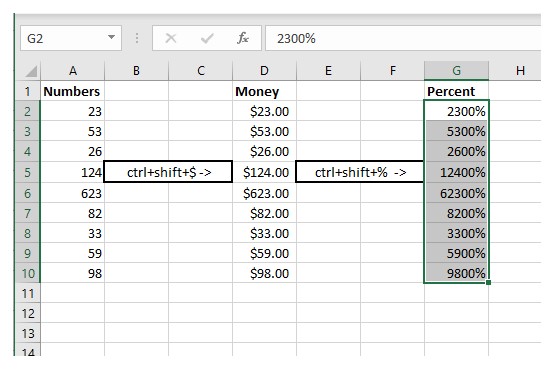
If you have a column of numbers that need to be transposed into dollars or percentages, stop right-clicking. Just highlight the data set and use this shortcut. To turn numbers into dollars, press ctrl + shift + $. To turn numbers into percentages, press ctrl + shift + %. It's logical, simple, and elegant.
1/5
Key Objectives
Inserting a New Row or Column
It never fails, you're knee deep in a data set and you realize that you need an extra column or row. Don't right click! Simply select the entire column or row and press Ctrl + shift + plus(+) and a new row or column will magically appear. Similarly, using the minus (-) rather than the (+) will rapidly delete columns and rows.
2/5
Key Objectives
Inserting Today's Date
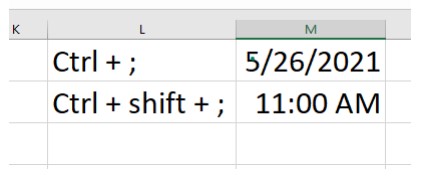
Dates are a pain to type and even the fastest hands can't beat this shortcut. Click a cell and press Ctrl + ;. Just two buttons with your left hand, and today's date will magically appear. As a free bonus, try adding the shift key to that combination. Ctrl + shift + ; will automatically insert the current time. If your job requires logging communication, this shortcut will give you your life back.
3/5
Key Objectives
Auto Sum a Number Set
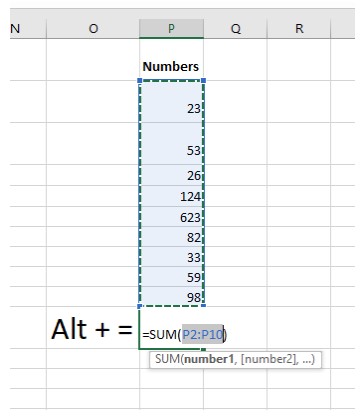
Select the cell beneath the number set you wish to add together. Press Alt + =. That's it. No selecting, no menus, just Alt + =. If you need to extend the parameters, click and drag the highlighted box.
4/5
Key Objectives
Turning Columns into Rows
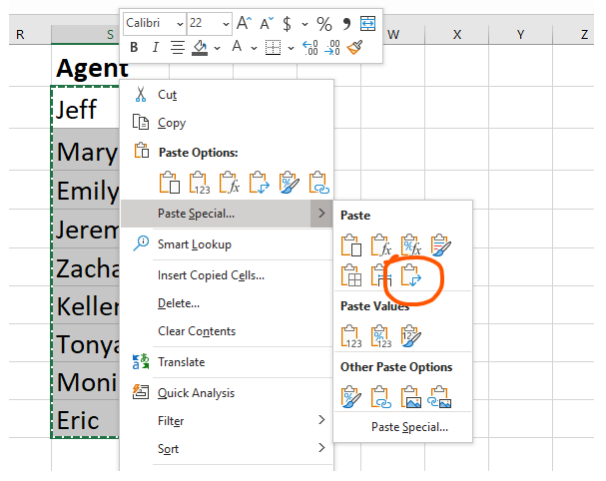
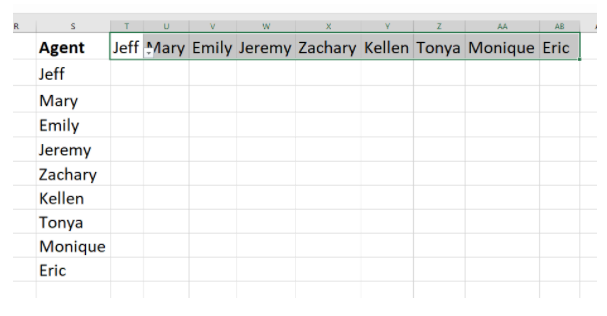
Sometimes a column in one sheet needs to be a row in another. Simply highlight the data set and copy [Ctrl + c] the data. Then right-click a new cell and select "Paste Special." One of your options will be "transpose." Clicking this will flip that column right into a row of data.
5/5
Conclusion
If any of these tips have you thinking about upping your Excel skills, check out our entire library of courses. TrainUp.com has every skill level covered for every Microsoft product. Here are some of today's trending Excel courses:
Excel 2019 - Part 1
This course aims to provide you with a foundation for Excel knowledge and skills, which you can build upon to eventually become an expert in data manipulation. Excel can help you organize, calculate, analyze, revise, update, and present your data in ways
20779 Analyzing Data with Excel
The main purpose of the course is to give students the ability to add BI techniques to Excel data analysis. The course goes beyond the capabilities of tables and charts and uses Pivot Charts, the Excel Data Model, and Power BI.
Programming and Data Wrangling with VBA and Excel® (v1.0)
VBA (Visual Basic for Applications) enables you to enhance and extend the capabilities of Microsoft® Excel® and other applications in the Microsoft® Office application suite. You can use VBA to perform tasks that would be difficult or impossible to do usi